PinochleSC
Using the Application
The Menu button gives you access to:
- New Game — Start a fresh game
- Option Sections — Configure game options
- Game History — Review completed games
- Subscription — Manage your subscription
Starting
Select the first dealer. Names can be changed by long pressing a name and tapping Rename.
Bidding
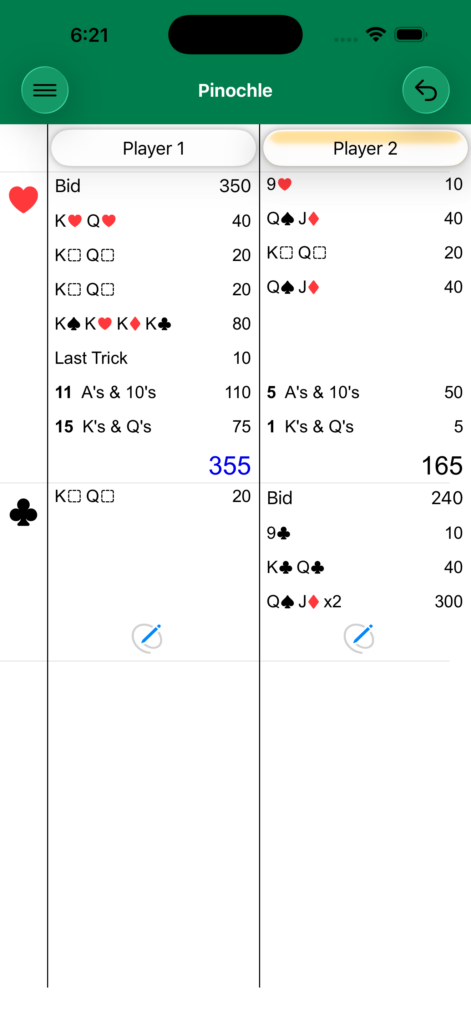
With Bidding enabled: Tap the winning bidder's button to reveal bid entry, then enter the bid. Done is available once a bid above 0 has been entered. The app doesn't enforce a minimum bid or a step, so agree those with your players.
With Bidding disabled: Tap the left button to select the trump suit directly.
Concede and No Marriage
With Bidding enabled, the bidding side's meld list starts with Concede and No Marriage. They are only there until that side has chosen a meld, and each can be turned off in Options.
- Concede — The bidding side gives up the hand before play. It loses its bid, and the opponents score as set on the Concede page. Have the opponents choose their melds first if they should count.
- No Marriage — The bidder has no marriage in trump, so the hand isn't played. The bidding side loses its bid and nobody scores meld.
Scoring Melds
Tap each player's button to select their melds. Long press a meld to double it; with Double Deck on, a long press offers double, triple and quadruple. After scoring melds, tap Last Trick and enter the point value counters. The app groups counters by value.
Long pressing Last Trick lets you select End Game to finalize the hand.
Options
Bidding — Enable or disable the bidding phase.
Double Deck — Play with two decks (80 cards, no nines). The Dix and the 9's counter are removed, and a long press on a meld offers triple and quadruple as well as double. Meld Points and Counter Points keep a separate set of values for Double Deck, so switching between the decks never changes either one.
No Marriage — Offer No Marriage to the bidding side (needs Bidding).
Concede — A page of options for conceding (needs Bidding):
- Allow Concede — Turn Concede on or off.
- Opponents Score — What the opponents score when the bidding side concedes: Their Meld, 25 or 50.
- If at least — The opponents only score if their meld is at least this number. The default is 20.
Meld Points — Customize point values for each meld.
Counter Points — Customize point values for counters. With Double Deck on, aces, tens and kings count 1 each by default.
Privacy Policy
This app collects no user data of any kind. All data, such as player names, scores, and game history, are recorded on your devices and only your devices. This data may be synced across your own devices via iCloud.